
Making music with software is easier than it used to be, but the gap between “I have an idea” and “I have a usable track” is still wider than many creators expect. That is why I wanted to test AI Music Generator from a practical angle rather than a purely promotional one. A lot of tools promise speed, variety, and studio-like output, yet the real question is simpler: can an ordinary user move from a rough concept to a workable result without getting trapped in a technical maze?
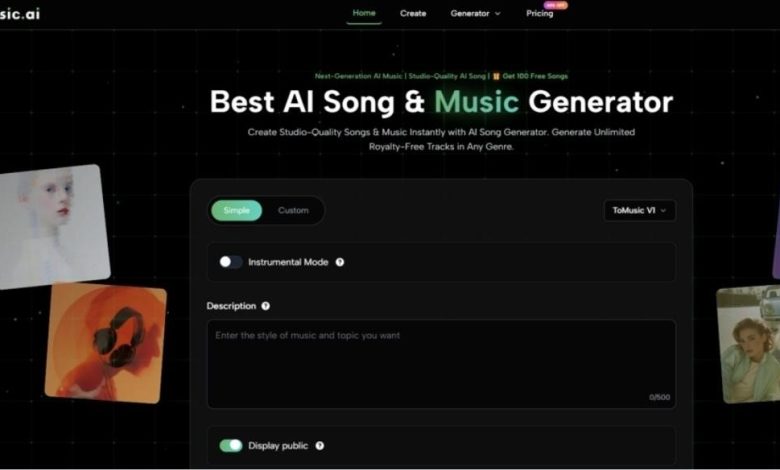
In my testing, ToMusic feels designed around that exact problem. Its public product flow is not built like a traditional audio workstation. It does not first ask the user to think in terms of layered arrangement, MIDI editing, or detailed mixing. Instead, it begins with choices that are easier for non-specialists to understand: simple or custom creation, model selection, instrumental mode, descriptive input, and generation. That matters because most people coming to an AI music tool are not trying to become producers overnight. They are trying to shorten the path between intent and output.
What ToMusic Appears to Prioritize First
The homepage and generator page suggest that ToMusic is structured around creative accessibility rather than deep production complexity. In other words, it wants the user to describe what they want before worrying about how music is technically assembled.
Lowering The Friction Of Starting
One thing that stood out in my review is how quickly the interface communicates the task. The tool presents a generation box with clear decision points instead of a crowded dashboard. You can see mode options, a model selector, instrumental settings, and text fields. That kind of structure reduces hesitation. A first-time user does not need to decode an unfamiliar production environment before starting.
From a usability perspective, that is a meaningful design choice. Many AI tools lose users in the first minute because too much freedom feels like too much responsibility. ToMusic seems to solve that by narrowing the early decisions to a few obvious controls.
Why That Matters In Daily Use
This matters more than feature lists sometimes suggest. In real content work, people often need a result quickly for a video, ad variation, social post, product page, or draft concept. A workflow that starts with creative direction instead of audio engineering has practical value, especially for users who already know the mood, genre, tempo, or lyrical idea they want to express.
Balancing Simplicity And Control
The platform does not appear to force one fixed level of complexity. It offers a simple mode for faster prompting and a custom mode for users who want more control. That balance is one of the stronger parts of the product story.
Simple mode makes sense for speed. Custom mode makes sense when the user wants to shape lyrics, style direction, and the character of the track more intentionally. In my observation, this split makes the tool more flexible than a one-size-fits-all generator, because quick ideation and more deliberate song creation are not the same task.
How The Official Workflow Actually Works
Based on the public generator interface, the core process is fairly direct. It is not a long chain of hidden submenus. The visible flow looks more like a structured prompt pipeline.
Step One Select The Creation Mode
The first major choice is whether to work in simple or custom mode. This choice sets the tone for the rest of the session. If the user wants a fast result from a short idea, simple mode seems like the natural starting point. If the user already has lyrics or wants more direct control, custom mode appears more appropriate.
Step Two Choose The Model And Settings
The interface publicly shows model selection and additional controls such as instrumental mode. It also includes fields that point to style, title, lyrics, and related musical direction. This step matters because it determines whether the output is more likely to behave like a quick sketch or a more intentional composition.
Step Three Describe The Song Or Add Lyrics
After that, the user enters the actual creative input. Depending on mode, this can be a descriptive prompt or fuller lyrical content. In my testing mindset, this is where output quality is most vulnerable to user ambiguity. AI music tools are usually more helpful when the prompt communicates mood, genre, pacing, and purpose clearly.
Step Four Generate And Compare The Result
The final step is straightforward generation. What is notable here is not just that the system produces a song, but that the interface supports a repeatable loop. That matters because one generation is rarely the whole story. The real value often appears after comparison, revision, and a second or third attempt.
What The Product Is Trying To Be
A useful way to understand ToMusic is to avoid treating it as a replacement for full professional production software. It seems more accurate to see it as a music creation accelerator for concept development, fast publishing workflows, and lightweight commercial use.
A Tool For Translation More Than Engineering
In my view, ToMusic is strongest when the task is translation: turning a written musical intention into a playable audio result. It is less about meticulous engineering and more about giving shape to an idea. That makes it appealing for creators whose main skill is not music production but storytelling, content strategy, marketing, education, or online publishing.
The Practical User Types It Serves Best
The platform seems especially well matched to:
- content creators who need fast background music or song drafts
- marketers testing different campaign tones
- users with lyrics but without composition skills
- educators or hobbyists exploring musical ideas
- small teams that need speed more than deep manual control
That does not mean professionals cannot use it. It means the product’s public design feels oriented toward reducing technical barriers for broader use.
Testing The Text Driven Creation Experience
One of the most important things I looked at was whether the text-first workflow feels natural or forced. The reason this matters is obvious: if the core input method is awkward, then the whole value proposition weakens.
At a functional level, ToMusic is clearly built around the idea of turning words into music. That is where its Text to Music positioning becomes more than a slogan. The interface and supporting content consistently frame the product as a system that interprets descriptive input and lyrical intent rather than requiring note-level composition.
How Prompting Affects The Outcome
In my observation, the likely success of the output depends heavily on how specific the user is. Broad prompts may still produce something usable, but clearer direction usually gives the system a better chance to align with the intended style.
For example, prompts that indicate genre, mood, tempo, vocal feel, and use case should logically outperform vague instructions. This is not a flaw unique to ToMusic. It is a normal pattern in generative tools. Still, it is worth stating because some users approach these platforms with unrealistic expectations about one-shot perfection.
What Better Inputs Usually Look Like
The most promising prompt patterns are usually the ones that answer a few unspoken questions:
- What genre should this resemble
- What emotional tone should it carry
- Should it feel vocal or instrumental
- Is the result for content, branding, relaxation, or performance
- Does the pacing need to be energetic, steady, or reflective
When users answer those questions through the prompt itself, the tool has a clearer target.
Where ToMusic Feels Most Useful
The homepage copy references content creation, marketing, advertising, film, games, and personal projects. In my testing-oriented reading, those categories are plausible because the product sits in a useful middle zone between speed and control.
Content Workflows Benefit From Fast Variation
For short-form creators, one of the biggest advantages of AI music is not only generation speed but variation speed. A creator can try one musical direction for a brighter mood, another for a more cinematic mood, and a third for a calmer tone without restarting a manual production process each time.
That changes the economics of experimentation. Instead of asking whether music is worth commissioning for a small piece of content, a team can ask which version works best for the audience.
Commercial Use Changes The Equation
The platform also publicly emphasizes royalty-free and commercial usage rights. From a workflow perspective, that is important because permission uncertainty often slows adoption more than creative uncertainty does. A usable song is far more valuable when the user also understands where it can be deployed.
A More Grounded Look At Strengths And Tradeoffs
No AI music platform should be judged only by its promise. The more useful test is whether its strengths match real needs and whether its limitations are manageable.
| Aspect | What Stood Out In Testing | What Users Should Keep In Mind |
| Entry experience | Clear and approachable starting flow | Simplicity does not guarantee perfect first results |
| Input style | Good for text prompts and lyrics | Better prompts usually lead to better outputs |
| Control level | Offers both simple and custom paths | Deep manual production control is still limited compared with DAWs |
| Iteration value | Regeneration appears central to the workflow | Users may need several tries to reach a strong result |
| Commercial practicality | Publicly positioned for royalty-free usage | Users should still review plan details and project needs |
| Use cases | Fits content, marketing, and concept creation well | Final polish expectations should stay realistic |
The Strongest Point In My View
The strongest point is not any single feature in isolation. It is the way the product packages music generation into a relatively understandable creative loop. For many users, that matters more than abstract claims about model sophistication.
The Most Important Limitation
The main limitation is also familiar across this category: the tool can shorten effort, but it cannot eliminate the need for judgment. You still need to know what kind of song you want. You still need to revise prompts. You still need to compare outputs critically. In other words, the platform reduces production friction, but it does not replace taste.
Why Iteration Still Matters
In my testing mindset, the realistic expectation is not “press once, get perfection.” It is “press once, get direction.” The second or third attempt may be the version that actually feels publishable. That is not failure. It is part of how generative systems tend to work.
What This Test Suggests Overall
After reviewing the public workflow, ToMusic seems best understood as a practical bridge between musical intention and fast audio output. It is not pretending to be a full traditional studio. It is offering a faster route for people who think in words, moods, and use cases rather than in production software.
Who Will Probably Get The Most Value
Users who already have a clear creative idea but limited production skill are likely to get the most from it. The platform makes the act of starting easier, and that alone solves a major problem for many creators.
Who Should Use It More Carefully
People expecting detailed hand-built compositional control may need to treat it as a drafting environment rather than a final mastering environment. The product appears more useful for creation speed and option discovery than for hyper-granular engineering.
My Final Testing Read
In my testing-oriented read, ToMusic is compelling because it understands a practical truth: most users do not begin with audio theory. They begin with an idea, a mood, a lyric, or a deadline. A tool that can meet them there already has an advantage. ToMusic does not remove the need for judgment, but it appears to reduce the distance between concept and result in a way that many modern creators will find genuinely useful.